Your whole day at a glance
Open KennelDesk and see what matters straight away: who's in, who's arriving and leaving today, which kennels are free, and who's waiting for a call back.
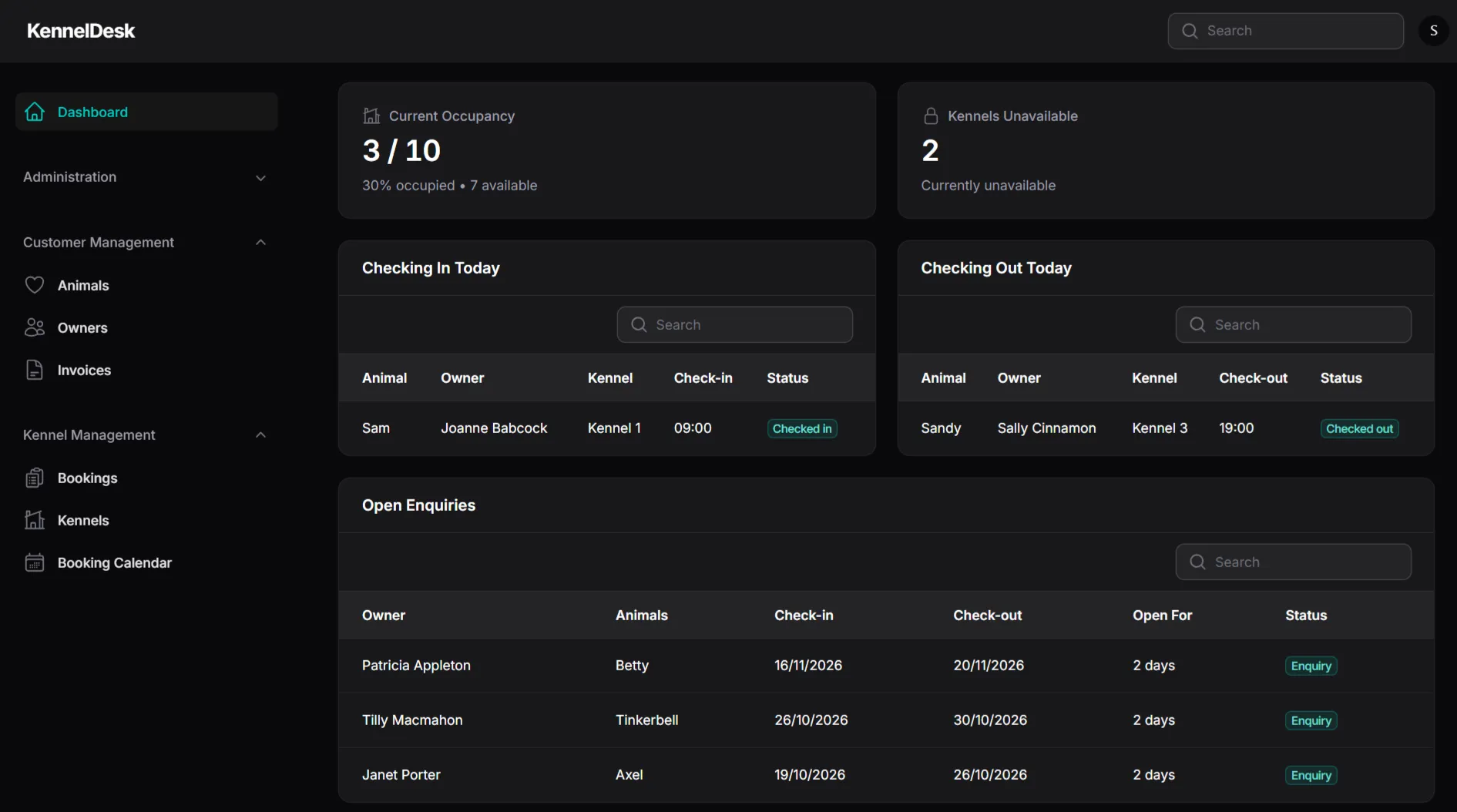
What you can do
Current occupancy
See how many kennels are in use, the percentage occupied and how many are free right now.
Kennels unavailable
Spot any kennels that are out of action, such as closed for cleaning.
Checking in today
A clear list of who's arriving today, with their kennel and check-in time.
Checking out today
A clear list of who's leaving today, so handovers run smoothly.
Open enquiries
See who has asked about a stay but hasn't booked yet, ready for a follow-up call.
New booking
Start a new booking for an owner and their animals straight from the dashboard.
Start every day with a clear picture
The first few minutes of a kennel or cattery day set the tone: who's arriving, who's going home, which kennels are ready and which aren't. With a paper diary or a spreadsheet you piece that together yourself. With the KennelDesk dashboard, it's already there when you log in.
Fewer surprises
Showing today's check-ins and check-outs next to your occupancy and your unavailable kennels means you can plan the day around what's really happening. It's one of the simplest ways to avoid the muddles behind most double bookings.
How it works
Log in
Open KennelDesk on your computer, tablet or phone and you land on your dashboard.
Check the day
See your occupancy, which kennels are unavailable, and who is arriving and leaving.
Act on it
Start a new booking, or pick up the phone to follow up an open enquiry.
Who it suits
- Owners who want to know where they stand the moment they start work
- Teams who need a shared picture of the day, whoever is on shift
- Anyone who is tired of piecing the day together from a diary and a spreadsheet
Quick answers
What does the dashboard show?
Your current occupancy, any kennels that are unavailable, who is checking in and out today, and your open enquiries. It also has a button to start a new booking.
Can I see it on my phone?
Yes. KennelDesk is cloud-based, and the dashboard works on a computer, tablet or phone.
Can I search the lists?
Yes. The check-in, check-out and enquiry lists each have their own search box.
What does "kennels unavailable" mean?
It counts the kennels that are out of action, for example because they are closed for cleaning, so you do not book them by mistake.
Ready to ditch the paperwork?
Try the live demo, or book a discovery call and we'll talk through how KennelDesk could work for your kennel.